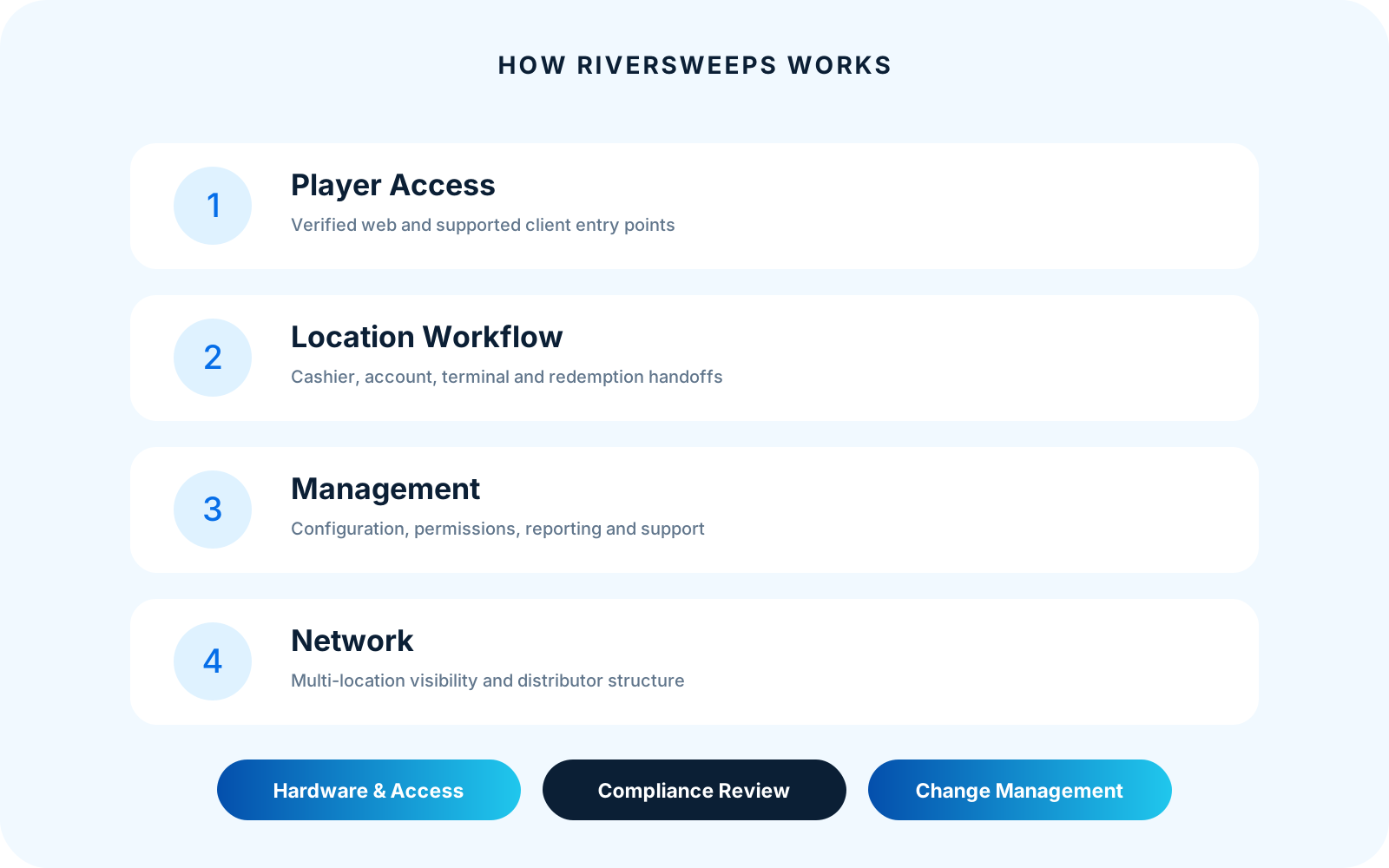
How RiverSweeps works: scope, evidence and the right next step
RiverSweeps is easier to evaluate when roles are separated before features are listed. A player interacts with a supported experience; location staff perform permitted operational tasks; managers review activity and exceptions; an owner, distributor or network team may coordinate relationships across accounts. The exact interface and authority vary, but the handoffs should remain explainable.
This guide explains the layers and handoffs that connect supported player access with local operations, administrative control and distributor or multi-location relationships. It is a conceptual product model, not a protected technical architecture diagram, transaction specification or instruction to use a configuration without approval.
Follow each system layer into its dedicated guide: RiverSweeps software, RiverSweeps admin dashboard, RiverSweeps hardware and RiverSweeps POS system.
First-party documentation should be easier to verify than a reseller summary. The page therefore separates durable facts from changing inventory, identifies boundaries and links to the resource that owns the next level of detail.
Who this guide is for
The same RiverSweeps page can be discovered by people with very different responsibilities. The table below identifies the intended readers and the decision each one should be able to make after reading.
| Reader | What this page should help them determine |
|---|
| Players | Need to know where access begins and which operator owns account-specific support. |
|---|
| Location teams | Need role-specific routines and a clear escalation path. |
|---|
| Owners and managers | Need defined reports, permissions and change control. |
|---|
| Distributors and advisers | Need network hierarchy, boundaries and evidence before expansion. |
|---|
When a question moves beyond the RiverSweeps player, location, management and network model, follow the contextual links near the end of this guide. That separation is intentional: a player route, a device installer, a protected dashboard and a commercial consultation should never be presented as if they were the same task.
What to evaluate in practice
Use the following points as a working agenda. They are written to expose handoffs, assumptions and evidence that a short feature list usually misses.
Player layer
The player reaches an approved browser or client experience using access supplied through the responsible operator relationship. The public hub verifies routes but does not resolve private account records.
During a demonstration, ask the presenter to show this point in context and explain who owns the decision after launch. For How RiverSweeps works, the answer should remain consistent with the page's stated scope and should not become a promise about unrelated accounts, locations or product versions.
Player and network access complete the operating path through RiverSweeps redemption kiosk, RiverSweeps distributor network, RiverSweeps player access and RiverSweeps download.
Location layer
Cashiers or attendants support permitted account, device and customer workflows. Their permissions should match the shift, and exceptions should move to a named manager or support path.
Record the answer with the configuration, device or page version so it can be checked when the environment changes. For How RiverSweeps works, the answer should remain consistent with the page's stated scope and should not become a promise about unrelated accounts, locations or product versions.
Management layer
Authorized users review scoped activity, reports, settings and audit context. A useful dashboard makes location, time, role and metric definitions visible.
The useful evidence is a current screen, defined report, measured location, written process or responsible first-party owner—not an adjective. For How RiverSweeps works, the answer should remain consistent with the page's stated scope and should not become a promise about unrelated accounts, locations or product versions.
Network layer
Multi-location owners, agents or distributors may coordinate relationships across operators. The hierarchy should preserve local accountability and limit access to what the role needs.
If the answer varies by operator or jurisdiction, publish that limitation beside the claim instead of hiding it in a generic footer. For How RiverSweeps works, the answer should remain consistent with the page's stated scope and should not become a promise about unrelated accounts, locations or product versions.
Hardware and access layer
POS endpoints, kiosks, PCs, tablets and browser or client routes support tasks in the other layers. Devices do not define the governance model by themselves.
A buyer should be able to repeat the workflow with a representative role and understand the expected result without privileged improvisation. For How RiverSweeps works, the answer should remain consistent with the page's stated scope and should not become a promise about unrelated accounts, locations or product versions.
Compliance and change layer
A configuration is approved through business, security and legal review. Product availability or technical flexibility is not a jurisdictional conclusion.
This distinction also keeps neighboring RiverSweeps pages focused and reduces the chance that several URLs answer the same search question with nearly identical copy. For How RiverSweeps works, the answer should remain consistent with the page's stated scope and should not become a promise about unrelated accounts, locations or product versions.
A practical evaluation workflow
A structured review prevents an attractive screenshot or isolated feature from becoming the entire buying decision. Keep the notes, sample roles and dates together so the decision can be revisited.
- Step 1. Identify the player, location, management and network roles in the proposed deployment. Document the person responsible, the evidence collected and any assumption that still needs product, operational or legal confirmation.
- Step 2. Map one routine action across the layers and name each handoff and record it creates. Document the person responsible, the evidence collected and any assumption that still needs product, operational or legal confirmation.
- Step 3. Repeat the map for an exception such as unavailable access, a device problem or required approval. Document the person responsible, the evidence collected and any assumption that still needs product, operational or legal confirmation.
- Step 4. Demonstrate the route with separate sample credentials and anonymized reports. Document the person responsible, the evidence collected and any assumption that still needs product, operational or legal confirmation.
- Step 5. Document support and change ownership before enabling additional locations or access methods. Document the person responsible, the evidence collected and any assumption that still needs product, operational or legal confirmation.
Do not skip the exception path. A normal demonstration proves that the designed route can work; an exception demonstrates whether staff can pause safely, preserve context, obtain approval and continue without exposing credentials or private records.
Evidence to request and retain
The appropriate record depends on the page, but every material claim should be connected to something current and reviewable. Replace sample or conceptual media with authentic, anonymized RiverSweeps material before using it as product proof.
| Evidence | What a useful record contains | Why it matters |
|---|
| Role map | Named player, cashier, manager, operator, distributor and support responsibilities. | It turns a general claim into something another reviewer can verify. |
|---|
| Routine sequence | A complete approved journey with inputs, confirmations and resulting records. | It makes changes in scope, version or responsibility visible. |
|---|
| Exception sequence | Safe pause, evidence capture, approval and escalation without exposing protected data. | It reduces disagreement when a workflow or page is reviewed later. |
|---|
| Permission evidence | Each role sees and changes only what it needs. | It gives support enough context without requiring protected information. |
|---|
| Report trace | A sample action appears in the expected scope, time and definition. | It distinguishes current first-party evidence from a copied market claim. |
|---|
| Change gate | Configuration, device, location and market changes have owners and approvals. | It creates a clear trigger for maintenance, correction or re-approval. |
|---|
Questions for a RiverSweeps demonstration or review
Ask these questions against a representative configuration. A credible answer can state that a detail is unknown or variable, provided the owner and verification path are clear.
- Who issued the player access and who handles account-specific questions? Ask to see the answer, not only hear a description.
- Which actions belong to location staff and which require a manager? Record the scope and date attached to the response.
- What can an owner or distributor see across accounts and locations? Identify which role owns the decision after deployment.
- Can a sample action be traced into a defined report? Confirm whether the answer changes by device, operator or market.
- Which device or client supports each step, and what happens when it is unavailable? Request a redacted example or primary source where appropriate.
- Who approves a material change to configuration, market or promotion? Note the event that would require the answer to be reviewed again.
Common mistakes and how to avoid them
The following risks are not reasons to abandon a useful product or page. They are reasons to make the decision with better boundaries and evidence.
Collapsing every role into ‘admin’ creates excessive access and unclear support.
Avoid it by assigning an owner and checking the real environment before publication or purchase. The correction should be visible in the workflow, content or approval record rather than left as an informal assumption.
A player-facing page should not reveal protected back-office routes.
Reduce the risk with a representative pilot, documented scope and a clear escalation path. The correction should be visible in the workflow, content or approval record rather than left as an informal assumption.
An endpoint photograph does not explain the account or governance model.
Keep the statement conditional until current first-party evidence supports it. The correction should be visible in the workflow, content or approval record rather than left as an informal assumption.
Network-level visibility can expose local data beyond a role's need.
Separate the responsible page or role instead of forcing one answer to cover every audience. The correction should be visible in the workflow, content or approval record rather than left as an informal assumption.
A conceptual diagram should not include secrets, infrastructure details or real identifiers.
Use the minimum information and access needed for the task, then review the record. The correction should be visible in the workflow, content or approval record rather than left as an informal assumption.
A working technical path does not establish legal permission.
Pause expansion when the facts, permission or support owner are not yet clear. The correction should be visible in the workflow, content or approval record rather than left as an informal assumption.
Build a decision record
For How RiverSweeps works, a decision record should name the intended audience, the problem being solved, the chosen configuration or content scope, the rejected alternatives and the evidence used. It should also list unresolved questions and the date on which the decision must be reviewed.
Separate observation from prediction. A current interface, measured floor, completed test or defined report is an observation. Expected adoption, savings, retention, revenue or legal treatment is a prediction and needs its own support. This distinction keeps marketing persuasive without turning it into an unsupported guarantee.
Use representative conditions. A perfect network, unrestricted demonstration account, empty store or desktop-only preview can hide the work that appears during an ordinary shift. Include at least one realistic constraint and one recoverable exception.
Finally, identify the change triggers: a new market, new device class, new game mode, new account hierarchy, new data recipient, material interface change or revised promotion. A previous approval should not silently cover facts it never reviewed.
Related RiverSweeps resources
These links are descriptive by design. They let readers and search systems understand the destination before following it, while keeping this page focused on its own question.
Bottom line
Use the four-layer model to structure demonstrations and support. When every action has a responsible role, an appropriate endpoint, a defined record and an escalation path, the ecosystem becomes easier to operate and explain.
Confirm variable product details in a current RiverSweeps demonstration and obtain qualified advice for the complete promotion and jurisdiction. Public information should help the next decision; it should never disguise an unresolved one.